

What we learned building a Clover-integrated ordering system for a BC pizza restaurant
A first-hand build log from launching order.chadspizza.ca — a commission-free, Clover-integrated ordering system for Chad's Pizza in Maple Ridge, BC. Real decisions, real trade-offs.
Most of what gets published about restaurant ordering systems is theoretical — “you could integrate with your POS” or “consider a custom build.” We just shipped one. This is what building order.chadspizza.ca for Chad’s Pizza in Maple Ridge, BC actually involved, and what we’d tell another restaurant owner considering the same thing. (Full breakdown of the finished build: the Chad’s Pizza case study.)
The starting point
Chad’s Pizza already had a Clover terminal running the counter — the same problem most independent restaurants have. Online orders either meant a 15–30% cut to a delivery app, or a generic ordering widget that didn’t talk to Clover at all, so every online order still got typed into the register by hand by whoever was on shift. Neither option scaled past a certain order volume, and neither one felt like Chad’s system — it felt like something bolted on.
Decision 1: build on Clover, not around it
The obvious shortcut is to build a standalone ordering site and bridge it to Clover with a middleware layer, or skip Clover integration entirely and reconcile manually at the end of the day. We didn’t do either. The ordering system talks to the Clover account directly — an order placed online lands in the same system as an order rung in at the counter, in real time, with no reconciliation step and no second source of truth to keep in sync.
This is more upfront integration work than a standalone site. It’s also the difference between “online ordering” and “online ordering that doesn’t create a second job.”
Decision 2: payments go through Clover, not a bolted-on processor
This is the detail that surprises people. A lot of custom ordering builds — including plenty we’d have shipped in years past — route payment through Stripe or a similar processor sitting between the customer and the restaurant’s actual merchant account. That works, but it means paying processing fees to a system that has nothing to do with the POS already running in the building, and it means yet another dashboard, another settlement schedule, another login.
Chad’s Pizza already had a Clover merchant account. So payments run through Clover directly — no second processor, no second fee stacked on top of what Clover already charges. We go deeper on when this is the right call (and when it isn’t) in Clover vs. Stripe for restaurant ordering systems.
Decision 3: the modifier logic had to match how pizza actually gets ordered
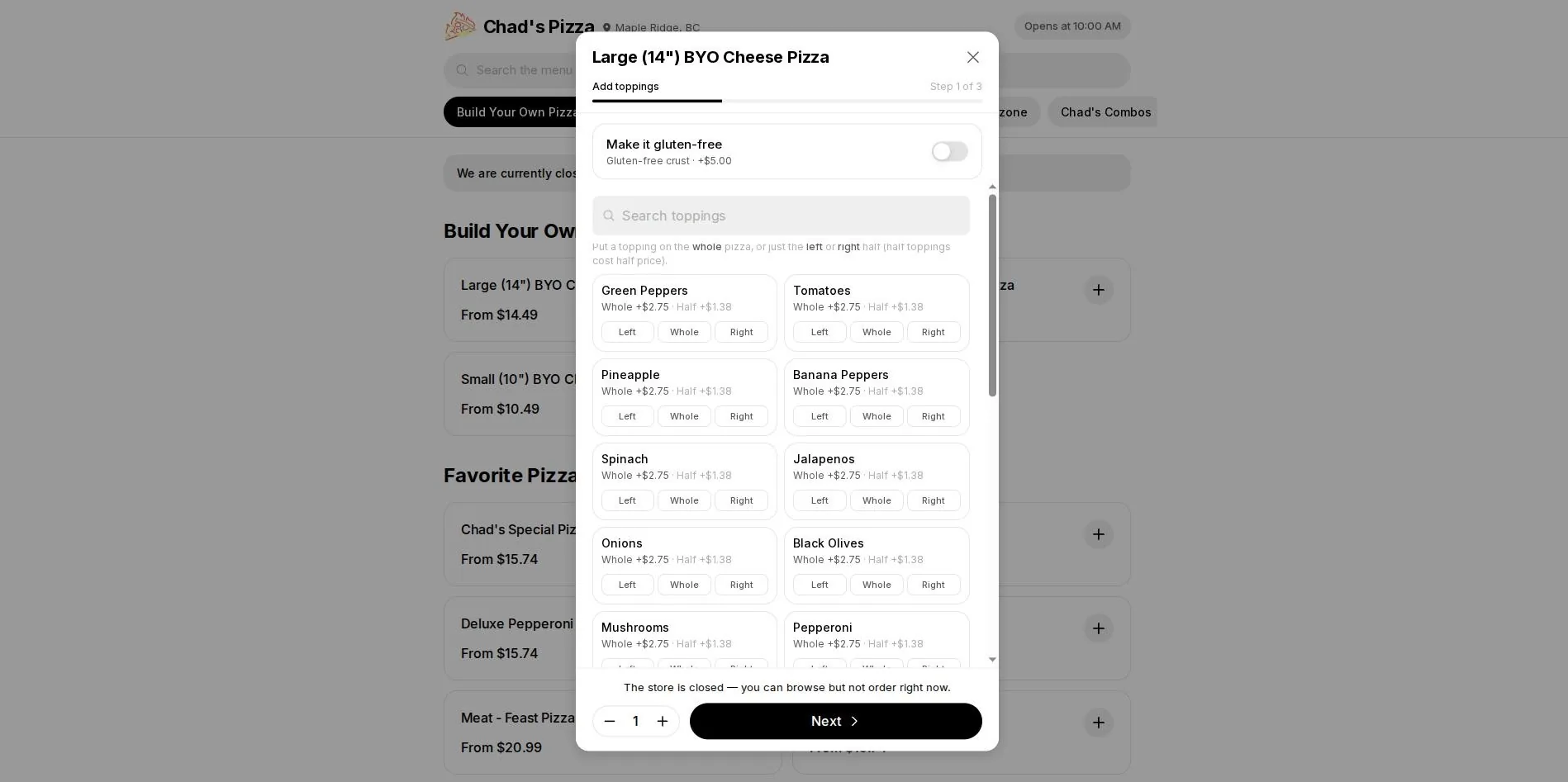
The build-your-own flow needed to support toppings on the whole pizza, the left half, or the right half — with half-toppings priced at half the whole-pizza rate — plus a gluten-free crust option that adjusts price without needing a separate menu item for every size-and-crust combination. This is exactly the kind of logic that off-the-shelf ordering widgets handle badly or not at all, because it’s specific to how pizza actually gets sold, not how ordering software assumes food gets sold. It took real modifier-logic work, not a plugin setting.
Decision 4: the site had to know when the kitchen was closed
An ordering site that’s always “open” for input, even when the kitchen isn’t, creates orders nobody can fulfill and phone calls nobody wants to make. The site checks store hours and switches to browse-only mode automatically outside operating hours — customers can still look at the menu, but the system won’t let them submit an order the kitchen can’t act on. Small detail, but it’s the kind of thing that only gets caught by actually running a restaurant’s ordering flow end to end, not by spec’ing it on paper.
What we’d tell another restaurant owner
If you already have Clover (or Square, or Toast) running your counter, the highest-leverage build isn’t a prettier menu page — it’s removing every point where an online order has to be manually re-entered, re-typed, or reconciled by a human at the end of the night. That’s where the real cost of “online ordering” hides, and it’s invisible until you’ve actually built the alternative. We put real numbers on what that’s worth in our break-even math against delivery-app commissions — and if you’re pricing out what a build like this costs, our restaurant ordering system cost breakdown uses this exact class of build as the reference point.
If you run a restaurant in BC with a POS you’re already happy with and a delivery-app bill you’re tired of, book a free 30-minute call — bring your current setup and we’ll tell you honestly what a build like this would take.
Written by Jazz Grewal, who builds these systems for BC service businesses.